Audience Exclusions
LinkedIn groups similar job titles into broader categories called "super titles." Each title you target may include hundreds of related titles. Some are relevant. Some are not.
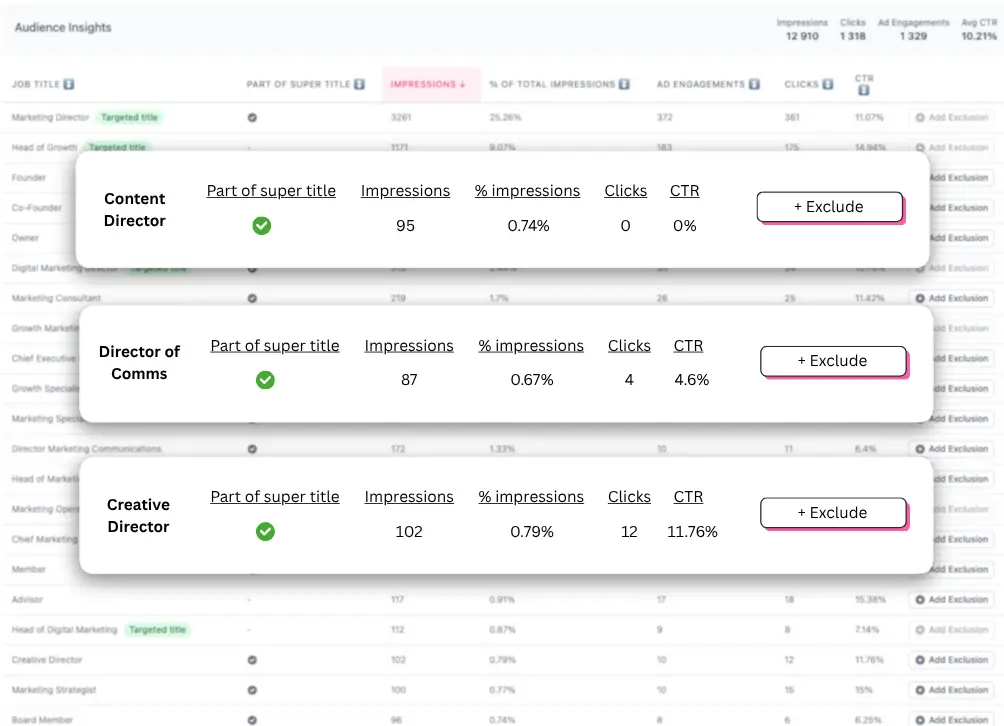
With Fibbler's audience exclusions, you can:
- See exactly which job titles have been served impressions in a specific campaign
- Exclude irrelevant titles from all campaigns at once, or from individual campaigns
When you exclude a title in Fibbler, it is applied directly in your LinkedIn Campaign Manager. You do not need to go into LinkedIn separately to make the change.
This helps you focus your budget on the titles that actually matter for your business.
Good to know
- Due to restrictions in LinkedIn's API, you can exclude up to 200 per campaign per month. The same 200-per-campaign limit applies to company exclusions used by Impression Caps.
- Exclusions apply to the specific campaigns you choose. They do not carry over to campaigns you later duplicate in LinkedIn; you need to set them again on the new campaign.
- If you are excluding companies and hit the limit, cap the largest companies first so your budget protection has the most impact.
My exclusions are not saving
LinkedIn's API caps exclusions at 200 per campaign per month, so the first thing to check is whether you are within that limit. This is the most common reason exclusions or caps appear not to save. If you are inside the limit and they still will not save, contact support@fibbler.co; some past cases have turned out to be bugs we needed to fix.