
LinkedIn Ads Slack Integration: How to Send Company-Level Engagement Alerts to Slack (2026 Guide)
Quick Summary
Running LinkedIn Ads and want Slack alerts when target accounts engage? Most teams only send Lead Gen forms. This guide shows how to capture company-level engagement (engagements, clicks), route it into Slack using Fibbler Signals, and turn ad exposure into real-time sales action.
Bring LinkedIn Ad Engagement Into Slack (So Sales Can Move Fast)
If you're running LinkedIn Ads, you've probably started seeing signs of traction like more impressions, more clicks, more engagement, and thought: "How do I get this into Slack so the sales team can actually act on it?"
But either you're not sure how to set it up, or the options you've seen feel limited. We've got you covered. And no - this isn't another "send Lead Gen form submissions to Slack using Zapier" tutorial. That only captures hand-raisers.
This guide shows you the better setup: sending company-level LinkedIn Ads engagement (engagements, clicks) into Slack while it's still fresh, so your team can prioritize the warm accounts immediately.
Why Listen to Us?
We're the team behind Fibbler, a LinkedIn Ads data layer built to help B2B teams turn ad engagement into actionable signals for sales, CRM, and reporting. We work with companies that want more than just CPL metrics. They want to understand which accounts are warming up, when they're warming up, and how that influences pipeline.
Here's what one of our customers had to say:
"In the era of no-clicks, Fibbler makes it possible to measure the influence of LinkedIn Ads for companies of any scale."
Canberk Beker
Founder at ROASted and Digital Marketing Partner at LinkedIn
So when we walk you through LinkedIn Ads Slack integration, know that it's based on real workflows we've seen teams implement to bridge the gap between marketing engagement and sales action.
Does LinkedIn Ads Integrate Natively with Slack?
LinkedIn Ads doesn't offer a native integration that automatically sends company-level engagement (like engagements or clicks) directly into Slack.
What you can do is send Lead Gen form submissions to Slack using tools like Zapier or Make. But that only covers form-based events, meaning you'll only get notified when someone fills out a form.
And while that's useful, it won't give you the full picture because B2B buyers are often deep into the buying process before they ever raise their hand. In fact, a DemandGenReport research shows buyers are nearly 70% through their purchasing process before engaging sellers, and 80% of the time, buyers initiate first contact. So if your Slack alerts only trigger on form fills, you're reacting late.
This is why most winning teams use a bridge layer like Fibbler: to capture company-level LinkedIn Ads engagement while it's still hot, then route that signal into Slack in a structured way, so sales can prioritize warm accounts before the form fill.
And that's exactly the setup we'll cover in this article.
Benefits of Integrating LinkedIn Ad Engagement to Slack Using Fibbler
When you connect LinkedIn Ads engagement to Slack using Fibbler, Slack stops being just a chat tool and starts becoming a real-time intent dashboard for your sales team. Here's what that unlocks:
Real-Time Visibility on Warm Accounts
Instead of checking LinkedIn Campaign Manager manually, your team gets notified when a company crosses a defined engagement threshold.
For example:
- "High engagement (last 7 days)"
- "Very high engagement (30-day window)"
- "Engagement level: High"
That means sales sees the signal while it's still fresh.
Faster Account Prioritization
Not every account deserves immediate outreach. Slack alerts allow you to:
- Prioritize target accounts showing increased engagement
- Trigger internal discussion ("Who owns this?")
- Move faster than competitors
Better Alignment Between Marketing and Sales
One of the biggest GTM problems is siloed data. Marketing sees engagement, sales sees pipeline and slack sees neither. By sending engagement signals directly into Slack, you create shared visibility. Now everyone sees which accounts are warming up and when.
Engagement-Based Alerts (Not Just Form Fills)
Most Slack integrations only trigger on Lead Gen submissions. Fibbler goes deeper. It captures company-level engagement like:
- Engagements
- Clicks
- Engagement level over 7 / 30 / 90 days
That means you can alert your team before someone fills out a form, while interest is building.
Custom Segmentation by Engagement Level
Fibbler assigns each company an engagement level based on engagement level, calculated as: (paid engagements + organic engagements) ÷ (paid impressions + organic impressions)
Based on that rate, companies are categorized as:
- Very High: above 3%
- High: 2-3%
- Medium: 1-2%
- Low: 0.5-1%
- Very Low: below 0.5%
This makes it easy to decide which companies deserve a Slack alert and which ones can stay in monitoring mode.
You can configure signals so that:
- Only "High" or "Very High" engagement companies trigger alerts
- Only specific campaigns send Slack notifications
- Alerts run daily or weekly
This way, Slack is only notified when meaningful engagement happens.
How to Integrate LinkedIn Ads with Slack Using Fibbler (Step-by-Step)
Now let's get into the actual setup. The flow is simple: LinkedIn Ads → Fibbler Signals → Slack (webhook alerts) → Sales action
Here's how to set it up cleanly.
Step 1: Run LinkedIn Ads to the Right Audience
First, you need engagement to capture, and that starts with targeting. This works best when you:
- Upload a defined ICP list into LinkedIn (Matched Audiences)
- Run Thought Leader, Text, Video, or Image Ads
- Focus on awareness + engagement, not only form submissions
The goal is to generate consistent exposure at the company level, so there's a real signal to trigger alerts from.
Step 2: Create a Slack Incoming Webhook
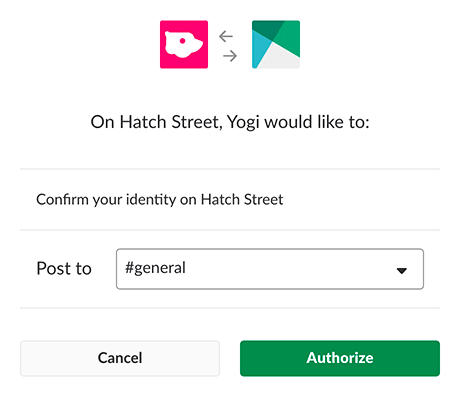
Slack alerts in this setup are powered by webhooks. Here's a quick setup:
- In Slack, go to Apps → search Incoming Webhooks
- Click Add to Slack
- Choose the channel you want alerts to land in (e.g., #sales-intent or #abm-alerts)
- Copy the Webhook URL Slack generates (it'll look like hooks.slack.com/...)
You'll paste this into Fibbler next.
Step 3: Create a Signal in Fibbler (This is the Bridge)
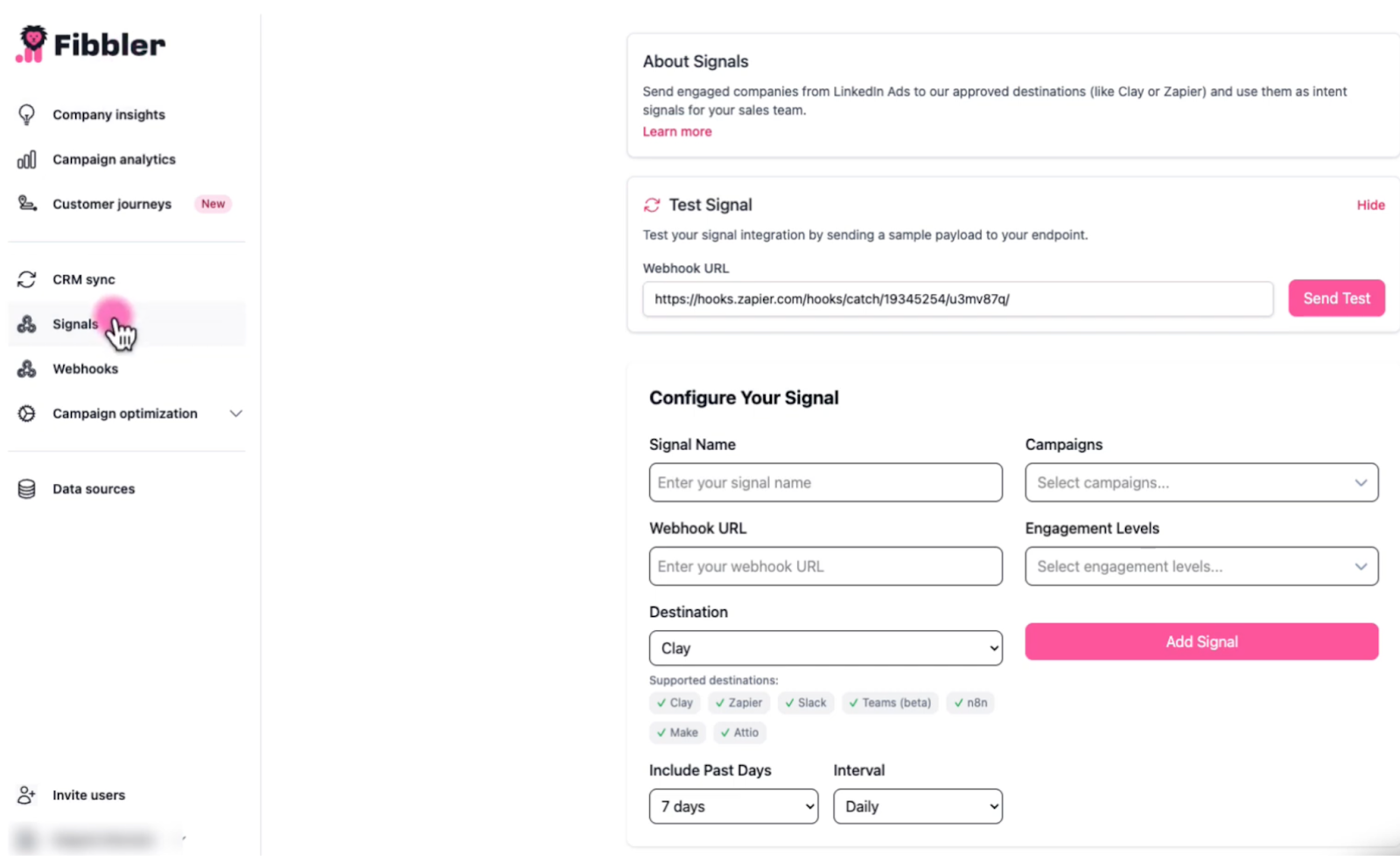
Inside Fibbler, go to Signals and create a new Signal. You'll configure:
- Signal Name (e.g., "High Engagement → Slack")
- Destination: Slack
- Webhook URL: paste your Slack webhook
- Include Past Days: choose 7 / 30 / 90 days
- Interval: Daily or Weekly
- Campaigns: select which LinkedIn campaigns to include
- Engagement Levels: choose what qualifies (e.g., High / Very High)
Fibbler assigns engagement levels based on a defined engagement level formula, so you're not guessing what "warm" means.
Before going live, hit Test Signal to send a sample payload to Slack and confirm everything works.
Step 4: Filter Alerts So Slack Stays Clean
This is where most teams either win or create noise. A good default is:
- Include Past Days: 7 or 30
- Engagement Level: High or Very High
- Interval: Daily (for fast-moving teams) or Weekly (for ABM digests)
You can also set up multiple Signals, for example:
- Very High engagement → #sales-intent (immediate action)
- Medium engagement → #marketing-insights (monitoring)
That way Slack only pings the right people at the right time.
Step 5: Use the Slack Alerts to Trigger Action
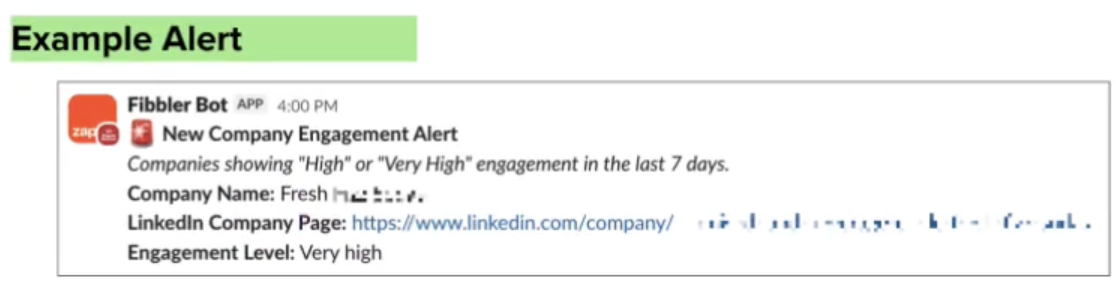
Once the Signal is live, Slack will start receiving alerts containing key fields like:
- company name
- LinkedIn company URL
- engagement level
- campaign name
- Timestamp
From there, your team can:
- assign an owner ("Who's taking this?")
- check CRM history
- trigger outbound (LinkedIn + email)
- add the company to an ABM sequence
Best Practices for LinkedIn Ads Slack Integration
Once the flow is live, the difference between "we get notifications" and "this actually drives pipeline" comes down to how you manage it. Here are the best practices that keep Slack useful instead of noisy:
Don't Alert on Every Impression
If every engaged company triggers a Slack message, your channel will become unreadable fast. Instead:
- Filter by High or Very High engagement levels
- Use shorter lookback windows (e.g., last 7-30 days)
- Set minimum engagement thresholds
The goal is to make Slack ping only when something is truly worth your attention.
Use Shorter Time Windows for Action
A company that engaged yesterday is very different from one that engaged 7 days ago. If this signal is meant to trigger outbound, tighter windows perform better because you're acting while exposure is still top-of-mind.
Separate Alerts by Intent (So Sales Doesn't Mute the Channel)
Not every notification should land in the same place. If you mix "high intent" alerts with "monitoring" alerts, you'll either overwhelm sales or water down urgency. A simple split by engagement level or campaign type keeps the right people seeing the right signal.
Don't Over-Reference the Trigger in Outreach
Remember that this is company-level engagement and not proof that a specific contact saw your ad. Avoid lines like "I saw you watched our ad." Let familiarity do the work in the background, and keep the outreach natural and aligned with your campaign theme.
Keep Campaign Reporting Clean
Certain campaign formats can skew impression volume and distort your alert logic. If you lump everything together, your "engaged accounts" list can get polluted with false positives. Keep your tracking clean so thresholds stay meaningful.
Assign Clear Ownership
Slack alerts are only powerful if someone acts. Decide who owns engaged accounts, what qualifies as "sales-ready," and what the expected response is when an alert hits. Otherwise, the signal turns into noise.
Treat This as a System, Not a One-Off Setup
The real value shows up over time. As ads run and accounts keep engaging, Slack becomes a consistent intent feed your team can act on daily.
Turning LinkedIn Engagement Into Action
At the end of the day, the goal isn't to get more data. It's to get the right signal in front of the right people fast enough to do something with it. That's what this workflow gives you:
- LinkedIn Ads creates awareness and repeated exposure.
- Fibbler Signals captures company-level engagement while it's still fresh.
- Slack alerts surface that signal where your sales team already works.
- Sales action turns warm engagement into real conversations (and pipeline).
If you're running LinkedIn Ads and want real-time Slack alerts when target accounts engage, Fibbler connects LinkedIn Ads engagement directly to Slack without hacks or messy workarounds.
Start your 30-day free trial to see it live.
LinkedIn Ads Slack Integration FAQ
Does LinkedIn Ads Connect Directly to Slack?
Not natively. LinkedIn Ads doesn't have a built-in Slack integration that sends company-level engagement (impressions, clicks, video views) into Slack automatically. To do that, you need a bridge layer like Fibbler that captures the engagement signal and routes it to Slack via webhook.
Can I Send Lead Gen Forms to Slack?
Yes. Lead Gen form submissions can be sent to Slack using tools like Zapier or Make. That setup is useful, but it only covers form-based events, meaning you'll only get notified when someone fills out a form.
How Do I Send Impressions and Engagement Alerts to Slack?
You'll need a system that captures company-level LinkedIn Ads engagement and pushes it into Slack via an incoming webhook. With Fibbler Signals, you set the destination as Slack, add your webhook URL, choose your time window, campaigns, and engagement filters, and Slack starts receiving structured alerts automatically.
What Engagement Level Should Trigger an Alert?
A good starting point is High or Very High engagement over a 7-30 day window. That usually strikes the balance between "warm enough to act" and "not so broad that Slack gets noisy." From there, you can adjust based on your volume and ICP.
Is this Useful for ABM?
Yes, especially for ABM. Slack alerts are perfect for account-based teams because they surface which target accounts are warming up so sales can prioritize outreach, coordinate internally, and act while the engagement is still fresh.
Can I Schedule Alerts Daily Instead of Real-Time?
Yes. You can run alerts on a schedule. For example, some teams prefer daily digests or weekly summaries to avoid notification fatigue, while others want faster alerts for high-intent accounts. With Signals, you can choose the interval that fits your motion.
Written by

Adam Holmgren
CEO @ Fibbler

See the real impact of your Paid Ads
Fibbler connects your ads data to your CRM so you can see which companies your ads influence and give your execs proof that LinkedIn & Google drives revenue.
Try 30 days for free
See the real impact of your Paid Ads
Fibbler connects your ads data to your CRM so you can see which companies your ads influence and give your execs proof that LinkedIn & Google drives revenue.
Try 30 days for free